
How to export CMYK PDFs from Figma
Figma is RGB-first and does not include native CMYK PDF export controls. Printery converts RGB layouts to CMYK, embeds ICC profiles, and adds the color controls you need for print-ready PDF export.
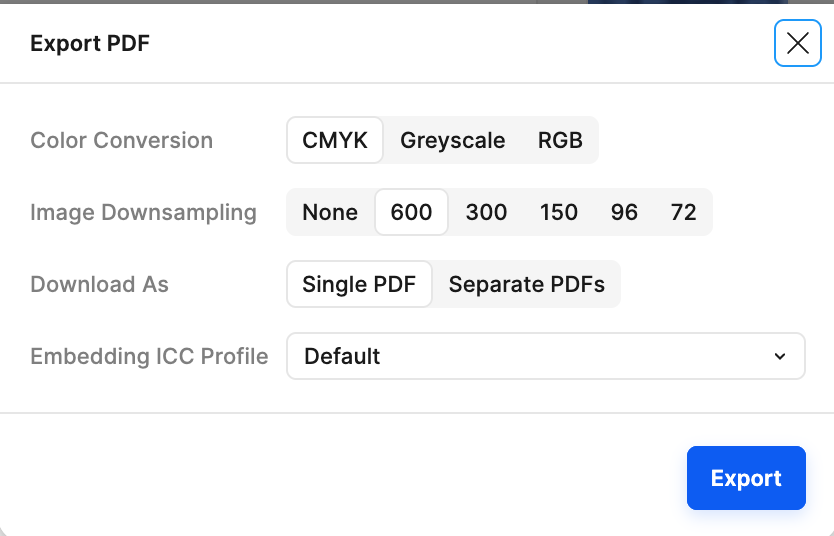
Native Figma export vs Printery CMYK export
| Print requirement | Native Figma export | Printery CMYK export |
|---|---|---|
| CMYK PDF output | No dedicated CMYK controls | Convert RGB to CMYK during PDF export |
| ICC profile embedding | No print profile selection | Choose and embed profiles for press output |
| Spot colors and overprint | Not part of native export | Map spot colors and control overprint behavior |
| Print-ready handoff | Often needs cleanup elsewhere | Export production PDF from Figma |
Need the exact steps? Read the CMYK PDF export guide.
Understanding RGB vs CMYK
RGB (Screen)
- How: Emits colored light (additive)
- Range: 16.7 million colors — wider gamut
- Used in: Monitors, phones, websites
- Mixing: Red + Green + Blue → White
CMYK (Print)
- How: Absorbs light with ink (subtractive)
- Range: Fewer colors — narrower gamut
- Used in: Offset & digital printing
- Mixing: Cyan + Magenta + Yellow + Key → Black
⚠️ The Problem: Some vibrant RGB colors (neon greens, bright blues, electric oranges) cannot be reproduced in CMYK. Without proper conversion, your prints will look dull and off-brand. Printery handles this automatically using ICC profiles.
Supported ICC Profiles
ICC profiles act as color translation dictionaries between RGB and CMYK. Choose the right profile for your region and paper type.
| Profile | Paper | Best For |
|---|---|---|
| European Standards | ||
| ISO Coated v2 [FOGRA39] (Most Used) | Coated | Default for most print projects worldwide |
| PSO Coated v3 [FOGRA51] ⭐ | Coated | Latest European standard, recommended |
| eciCMYK v2 [FOGRA59] | Coated | Exchange color space for cross-media workflows |
| ISO Coated v2 300% | Coated | Lower ink limit for digital printing |
| Coated FOGRA39 | Coated | Legacy European coated standard |
| North American Standards | ||
| U.S. Web Coated (SWOP) v2 ⭐ | Coated web | US magazine & publication printing |
| GRACoL 2006 Coated | Coated sheet | US premium commercial printing |
| SWOP 2006 Grade #3 | Coated web | US web offset, grade 3 paper |
| SWOP 2006 Grade #5 | Coated web | US web offset, grade 5 paper |
| Japan Standards | ||
| Japan Color 2011 Coated ⭐ | Coated | Latest Japan standard, recommended |
| Japan Color 2001 Coated | Coated | Legacy Japan coated printing |
| Japan Color 2003 Web | Coated web | Japan web offset printing |
| Japan Color 2001 Uncoated | Uncoated | Japan uncoated paper printing |
| Japan Color 2002 Newspaper | Newsprint | Japan newspaper printing |
| Japan Web Coated (Ad) | Coated web | Japan web advertising printing |
Advanced Color Features

RGB to CMYK Conversion
Automatically convert your RGB Figma designs to accurate CMYK colors using industry-standard ICC profiles. What you design is what gets printed.

ICC Profile Embedding
Embed ICC profiles (ISO Coated v2, US Web Coated SWOP, GRACoL, and more) directly into your exported PDF for consistent color reproduction at any print shop.
Pantone Spot Colors
Map your design colors to Pantone spot colors for exact brand color matching on press. Essential for logos, packaging, and brand-critical print work.
Overprint Control
Set fill and stroke overprint behavior to prevent knockout issues in professional printing. Control how inks interact when layered on press.
Accurate CMYK from Figma
Export print-ready CMYK PDFs with the right ICC profile. No more color surprises at the printer.